Page 1 of 1
Source Folder Pop-up window missing
Posted: 19 Dec 2025, 21:44
by dlflemingos
When I try to add source folders the pop-up window is nowhere to be found (hidden/missing) and the process is essentially hung. When I kill the process there is an AllDup process still running, presumably the pop-up window.
Another version of this issue is on my laptop the pop-up window is minimized and behind all the other windows. When I close all the windows (a lot) it will appear. This is inconvenient but workable. The situation above makes AllDup not usable.
I wonder if the situation in the first case is the pop-up window is behind the main Window and I can't minimize it the main window and hence can't find the pop-up window.
I have v4.5.70. I have W11 Pro v25H2. I try rebooting, reinstalling and nothing helps. I have plenty of memory available as I have 64GB of Ram on my desktop and 32GB on my laptop. I do not have this issue on any of my other apps.
I love AllDup and need to run it, please help.
Re: Source Folder Pop-up window missing
Posted: 21 Dec 2025, 04:15
by dlflemingos
Anyone else? Hard to believe this is only happening to me.
Re: Source Folder Pop-up window missing
Posted: 23 Dec 2025, 02:52
by therube
If you're speaking of this, working here, but I'm on Win7.
.
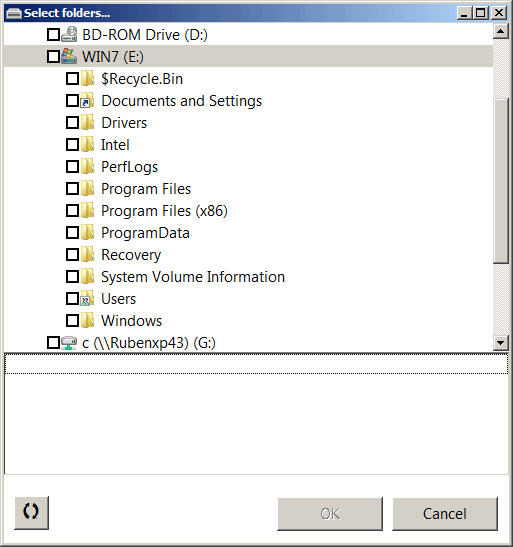
- AllDup 4.5.70 - Select Folders dialog.png (9.1 KiB) Viewed 10419 times
Re: Source Folder Pop-up window missing
Posted: 24 Dec 2025, 07:19
by Administrator
dlflemingos wrote: 19 Dec 2025, 21:44
When I try to add source folders the pop-up window is nowhere to be found (hidden/missing) and the process is essentially hung.
I cant reproduce this problem using AllDup 4.5.72 with Win10 and Win11.
The folder selection window is always on the top of the main window.
Re: Source Folder Pop-up window missing
Posted: 24 Dec 2025, 07:24
by Administrator
i remember i had the same problem with a software on another computer and this tool helped me to get back the hidden window:
Wherzit
Re: Source Folder Pop-up window missing
Posted: 06 Jan 2026, 06:17
by dlflemingos
I will try that.
I've noticed that the first time I try to add folders (after booting up) the window comes up once as a mini window very far from the main window. I can look for it and find it. The second time and all subsequent time, the window can't be found. My work around is to add folders by text input which works but not great when I want to add a bunch of folders.
BTW, the add folders feature normally works great, not sure why other programs don't do that.
Re: Source Folder Pop-up window missing
Posted: 11 Feb 2026, 14:23
by FerrevmVnion
Same here ... the only message in WER is this one
AppName AllDup.exe
AppVersion 4.5.0.72
ProcessId 0x3a48
StartTime 0x1dc9b267bf18fdc
TerminationTime 4294967295
ExeFileName C:\Program Files (x86)\AllDup\AllDup.exe
ReportId 41ca7257-8158-4e3c-a878-4fccb4ca288a
PackageFullName
PackageRelativeAppId
HangType Top level window is idle
Re: Source Folder Pop-up window missing
Posted: 11 Feb 2026, 23:45
by therube
When this happens, do you still have the AllDup icon on the Windows Taskbar?
From what I see on my end (Win7) the Add Folder dialog is modal to the main DC window, & so long as that dialog is open, you can't interact with the main window. Likewise if (say all) windows are minimized, clicking on the (AllDup) Taskbar icon does bring the main AllDup GUI window to front (though it is in the background, if you will) & shows the Add Folder dialog (in foreground).
I'll note that the Add Folder dialog is resizable, & even if sized to a "nub", what I've described does still happen.
(AllDup's) config4.ini, does store various window sizings.
So what you might do, is to...
Exit AllDup
Backup config4.ini
Rename config4.ini to... config4.B4
(at that point, there will be no "config4.ini" file, only the backup that you made & config4.B4 [which is also a backup]
Start AllDup
Exit AllDup
A new, default, config4.ini should then have been created.
(Note that doing so, any settings which you had previously set would no longer be there, but are in the backups you made.)
Compare the new config4.ini to the backed up, config4.B4.
(A comparison program would help for that.)
That might point out something... odd, like a:
frmSelectFileFolderDialog_Left=
frmSelectFileFolderDialog_Top=
with a negative value or some such.
There is also a, frmSelectFileFolderDialog_WindowState=#, that I'm not sure what that does, but on my end, # is 0, & I'll assume valid values could be 0 or 1? If (above) _Left=, _Top= look OK, if _WindowState is set to 1, you might try changing that to 0, & see if that makes any difference?
Anyhow, the comparison might point something out & you might want to post those differences here.
(And you can get your old settings back by reversing the process.
Exit AllDup
Rename config4.B4 back to config4.ini
With that fire up AllDup & whatever settings you had set before, should be back.)