☰ MTSD
  • AllSync Home page
  • Products
    • AllSync
    • AllDup
  • Order
    • AllSync Price List
    • AllSync Product Editions
    • AllSync Licensing Model
    • Order FAQ
    • Upgrade to AllSync Version 4
    • Upgrade AllSync Product Edition
  • Download
    • AllSync
    • AllDup
    • Customer Download Area
  • Support
    • Forum
    • Support Form
  • Contact
    • Contact Form
Search Customer Download Area Online Shop Customer Account DeutschDE
 
X
  • AllSync
  • Description
  • System Requirements
  • Product Editions
  • Features
  • Practical Examples
  • Version History
  • Screenshots
  • Awards
  • Publications
  • Download
  • AllSync Demo Version
  • AllSync Full Version
  • Recommendations
  • Help
  • FAQ
  • Manual
  • Guides
  • Support Forum
  • Translations
  • Web
  • Links
AllSync 4 Manual ➝ AllSync

AllSync Main Window

AllSync Backup Software

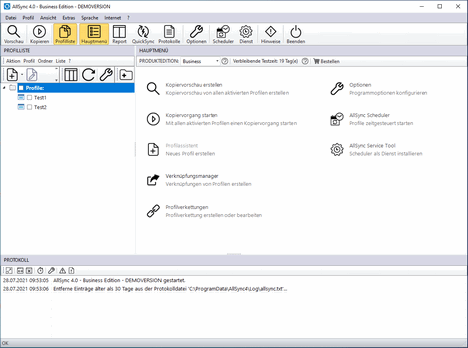
The main window of AllSync is divided into several sections:
  • At the top, you’ll find the menu bar and the toolbar.
  • On the left side, the profile list or the report legend is displayed.
  • On the right side, the main menu, the progress indicator, the report, QuickSync, or the log manager is displayed.
  • At the bottom, the log is displayed.

‣ Synchronization Software
‣ File Comparison
‣ Backup Storage
‣ Sync Software
‣ Backup and Restore
‣ File Folder Replication
‣ Backup Storage Media
‣ Backup
‣ Folder Backup
‣ Backup Utility


Deutsch Deutsch  ·  Site Map  ·  Print Page  ·  Top


© 2000 - 2025  MTSD